Day 1: Network Fundamentals — Network Types & the OSI Model (N10-009)
Introduction to Networking Fundamentals

Welcome aboard. Today is the “set the table” day: what a network actually is, how we classify different network types, and the seven-layer OSI model that CompTIA loves to test. Keep this close—everything you do on later days builds on these two ideas. (You’ll feel this immediately in Day 2: Exploring Network Topologies and Types and again when IP addressing shows up in Day 4: Subnetting Part 1.)
Make sure you make it all the way to the end to check out our mastery notes.
Objectives (N10-009)
Compare and contrast common network types (LAN, WAN, MAN, PAN, CAN, WLAN, SAN).
Explain the functions of the OSI model layers (1–7) and where common devices/protocols live.
What is a “network,” really?
A network is just devices agreeing on rules so they can talk—sharing data, internet access, or printers. At home that’s your router + Wi-Fi; at work it’s switches, routers, access points, and services playing nicely. For the exam, define it simply: connected devices + shared resources + agreed protocols.
Network Types (know the names, scope, and common examples)
Think of network types like maps with different zoom levels—street, city, region, world.
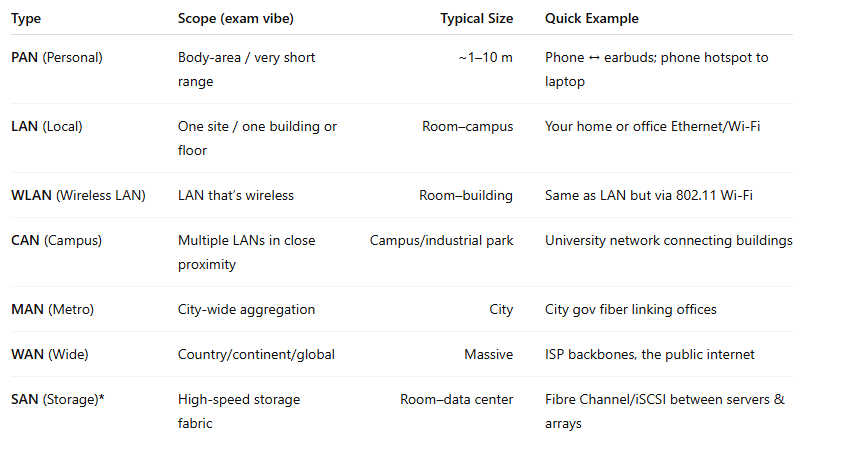
Exam cue: SAN ≠ “wireless.” It’s a storage network (often Fibre Channel). WLAN is your wireless LAN. That distinction shows up a lot.
You’ll revisit these categories when you study topologies tomorrow in Day 2: Topologies & Types, and again when we place devices in Day 8: Network Devices & CLI.
Analogy:
PAN = your personal bubble.
LAN/WLAN = your house.
CAN = your neighborhood of buildings.
MAN = the city grid.
WAN = highways between cities.
SAN = a private express lane just for storage traffic.
The OSI Model (7 layers, top to bottom & bottom to top)
OSI is a mental map for where things happen. CompTIA wants you to:
know what each layer does,
place common devices/protocols at the right layer, and
follow encapsulation (how data gets wrapped/unwrapped).
One-glance cheat table
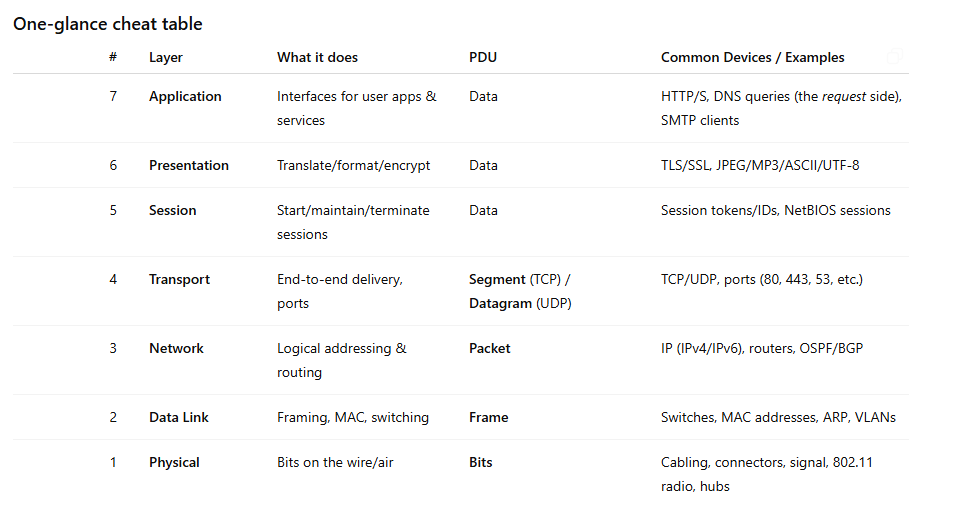
When we dive into media and connectors on Day 11: Cables & Connectors, you’ll anchor those details to Layer 1. Wireless specs on Day 12 land at Layer 1/2. When protocols and ports show up in Day 6: Protocols, that’s Layer 4 territory.
A conversational walkthrough (down then up)
7 → 5 (App/Pres/Session): Your browser forms an HTTPS request (Application), TLS encrypts it (Presentation), and a session gets tracked (Session).
4 (Transport): TCP gives it port numbers and reliability (think: “address + tracking number”).
3 (Network): IP adds source/destination IPs so routers can move it between networks.
2 (Data Link): Your NIC wraps it in a frame with source/dest MAC to cross the local LAN/WLAN.
1 (Physical): Bits go out as voltage/light/radio on cable or Wi-Fi.
Reverse on the way back up at the destination: unwrap → check → hand off to the app.
Analogy:
Layer 1 roads, Layer 2 neighborhood mailperson (MAC), Layer 3 city-to-city routing (IP), Layer 4 shipping service with tracking (TCP/UDP), Layers 5–7 the storefront/cashier/register finishing the transaction.
Mnemonic you’ll see everywhere:
Please Do Not Throw Sausage Pizza Away
(1–7: Physical, Data Link, Network, Transport, Session, Presentation, Application)
This framework is the backbone for packet flow you’ll practice in Day 9: Map Your Network with CLI and for placing devices in Day 10: Mastering Network Devices. App-layer services resurface in Day 14: Network Services & Applications.
Quick “exam traps” to avoid
WLAN vs. LAN: WLAN is a LAN (wireless flavor). Don’t treat it as a WAN.
SAN: Storage network (Fibre Channel/iSCSI). Not “wireless” and not the same as “LAN.”
Layers vs. Devices: Switches = Layer 2 (MAC/VLANs). Routers = Layer 3 (IP/routing).
(Yes, there are Layer-3 switches, but default switch ≈ L2 for exam.)Ports live at Layer 4, not Layer 7. HTTP is an app-layer protocol, but TCP/UDP ports are transport-layer details.
Encapsulation terms: Frames (L2), Packets (L3), Segments (TCP at L4), Datagrams (UDP at L4).
Tiny look-ups you’ll use all month
Common pairings:
Switch ↔ MAC/VLAN ↔ Layer 2
Router ↔ IP/routing ↔ Layer 3
TLS/SSL ↔ Layer 6 (encryption/format)
HTTP/HTTPS/DNS client behaviors ↔ Layer 7, but ports for them are at Layer 4
Where to study next: Topology names and diagrams flow straight into Day 2; addressing and routing logic get real in Day 4 and Day 23: Advanced Routing & Infrastructure.
Watch (solid, free explanations)
Professor Messer — Understanding the OSI Model (N10-009). If you’re taking Network+, this is home base for OSI. YouTube
PowerCert Animated — OSI Model Explained (animated). Clean visuals; great for locking in each layer. YouTube
PowerCert Animated — Network Types: LAN, WAN, PAN, CAN, MAN, SAN, WLAN. Quick refresh on scope and examples.
Fast recap
You can now name and classify PAN/LAN/WLAN/CAN/MAN/WAN/SAN by scope and examples.
You can place devices/protocols at the correct OSI layer and follow encapsulation.
You’ve set up the context for topologies (Day 2), protocols & ports (Day 6), devices (Day 8/10), media (Day 11/12), and services (Day 14)—so Day 1 keeps paying dividends.
That’s the foundation. On to Day 2: Exploring Network Topologies and Types to put shapes and diagrams to these networks.
Stop struggling with scattered Network+ study materials that leave you confused and overwhelmed.
Most people fail because they're memorizing random facts from outdated books instead of building systematic understanding. These master notes solve that problem with a proven curriculum that takes you from networking fundamentals to advanced implementation.
Each day builds systematically on the previous, using memory techniques and real-world analogies that make complex concepts stick. Every exam trap is identified, every high-yield topic is covered, and you'll understand not just what to memorize but why it matters in real networking.
This isn't just another study guide; it's a complete mastery system covering all N10-009 objectives with the depth and organization you need to pass confidently.
Subscribers get immediate access to the complete curriculum that's helped countless others master Network+ systematically instead of randomly. Day One is for everyone.
